SEO & AEO Strategist

Be found. Be chosen. Grow.

I use SEO, GEO and AEO to help businesses reach the right people across Google and AI search.

Portrait of Rosebell Ng’ang’a
SEO & AEO Strategist

Search visibility

AI discoverability

Qualified opportunities

I like SEO that is useful, specific and honest.

Working on live websites has taught me that a good recommendation only matters when someone can understand it, apply it correctly and verify the result.

I have worked across multiple service websites, supporting audits, local landing pages, content updates, internal linking, indexing checks and WordPress publishing. I am comfortable moving between a crawl, a spreadsheet, Search Console and the page itself.

I pay attention to the small things. I check the correct URL before reporting an indexing problem, protect the way a brand speaks and make sure a finished page works for the reader as well as search engines.

SEO support from the first audit to the final page.

From technical audits and content writing to publishing and performance reporting, I help businesses strengthen visibility, improve the path to enquiries and understand results through Search Console, GA4 and Looker Studio.

01

Technical SEO

I review crawling, indexing, canonicals, redirects, sitemaps and page structure. Then I turn the findings into a clear list that a team can actually use.

02

On page SEO

I improve titles, descriptions, headings, internal links and page copy so each page has a clear purpose and matches the way people search.

03

Local SEO

I plan and improve service and location pages with useful local detail, sensible internal links and consistent business information.

04

SEO content, GEO and AEO

I research, write and optimise useful content that matches search intent, answers real questions and gives search engines and AI platforms clear information to understand and reference.

05

SEO reporting and insights

I bring Search Console, GA4 and crawl data into clear reports and Looker Studio dashboards. I track impressions, clicks, CTR, landing-page engagement and indexing so businesses can see what changed, why it matters and what to prioritise next.

Real business problems solved through focused SEO work.

01

Case Study 1Indexing and technical SEO

Important service pages were not appearing in Google

Search Console · Screaming Frog · WordPress · XML sitemap
71%of reviewed pages confirmed indexed
Open case study
Overall problem

Several pages for a local home-service business appeared not to be indexed. Some checks used redirecting URLs, while other pages had genuine discovery or quality problems. I needed to separate false alarms from real indexing work.

Google Search ConsoleScreaming FrogWordPressYoast XML sitemapGoogle Sheets

Step by step process

1

Defined the indexing check I confirmed which service pages needed investigation and set the required outcome: assess the correct final URL and record an accurate indexing status for every page.Step result: A clear list of URLs and one success measure for every page.

2

Built the complete URL inventory I grouped every page by publication month, recorded the supplied URL and added fields for the final URL, response code, canonical, sitemap status, Search Console result and follow-up date.Step result: One tracker connected every URL to its technical evidence and next action.

3

Confirmed the correct live URL I opened each address, followed redirects and established that Google should assess the final HTTPS version without the redirecting prefix.Step result: Redirecting URLs were removed from the checks, preventing false indexing reports.

4

Crawled the pages In Screaming Frog I checked for a 200 response, indexable status, robots directives, canonical target, internal inlinks and inclusion in the XML sitemap.Step result: Eligible pages were separated from URLs with technical or discovery barriers.

5

Checked discovery signals I confirmed that each page appeared in the XML sitemap and could be reached through useful internal links from relevant service or location content.Step result: Missing discovery support was identified before indexing was requested.

6

Inspected the exact URL In Google Search Console URL Inspection, I entered the final HTTPS URL and reviewed whether it was on Google, whether crawling and indexing were allowed, the last crawl information and the declared and Google-selected canonical.Step result: Each page received a verified Google status instead of an assumption based on a site search.

7

Reviewed page delivery and enhancements I checked HTTPS delivery and available enhancements such as product, breadcrumb and review snippets so an indexing result was not reported without the supporting page details.Step result: Five indexed pages were also confirmed to be served securely over HTTPS.

8

Fixed or separated the cause Eligible pages received stronger internal discovery support. Pages marked discovered but not indexed moved to a content and linking review, while soft 404 pages were flagged for stronger page value and technical checking.Step result: Two unresolved URLs received different fixes based on their actual causes.

9

Requested indexing After confirming that the preferred page was live, indexable, canonicalised correctly and included in the sitemap, I used Request Indexing in Search Console for URLs that still needed Google to revisit them.Step result: Only technically eligible final URLs were submitted for recrawling.

10

Followed up and verified the result I waited before re-inspecting instead of submitting repeatedly, recorded the latest status and reported which pages were indexed, which needed further work and the next action for every unresolved URL.Step result: Five service pages were confirmed indexed; the remaining two had diagnosed causes and next actions.

Result5 of 7

Five reviewed service pages were confirmed indexed and served over HTTPS during the final follow-up inspection.

  • 71% confirmed indexed
  • 4 local service pages indexed
  • 1 general service page indexed
  • 2 unresolved URLs correctly diagnosed

Every reviewed URL received a verified status and a specific next action instead of being treated as the same indexing problem.

How I solved it

I traced every redirect to the final HTTPS URL, checked canonical and sitemap signals, strengthened internal discovery, requested indexing only when each page was eligible and re-inspected every URL to confirm the outcome.

How it helped the business

The business gained five additional indexed search entry points for customers looking for its services. The two remaining pages were no longer unknown problems: each had a diagnosed cause and a clear next action.

02

Case Study 2Technical audit and site quality

A 389-URL crawl was turned into a fix-ready technical plan

Screaming Frog · Search Console · Google Sheets · Source checks
389URLs audited
Open case study
Overall problem

The crawl contained hundreds of URLs and mixed high impact technical issues with harmless or low priority warnings. I needed to determine which findings could affect crawling, indexation and page quality, then give the team an ordered plan.

Screaming FrogGoogle Search ConsoleGoogle SheetsXML sitemapLive source checks

Step by step process

1

Confirmed the audit requirements I established which sections needed review, what the audit had to cover and which technical signals would be collected before starting the crawl.Step result: The audit scope centred on crawlability, indexation and priority service pages.

2

Defined the crawl scope I set the starting domain, crawl boundaries and data requirements before crawling 389 URLs for response codes, indexability, canonicals, headings, metadata, pagination and link data.Step result: 389 URLs were captured with a consistent set of technical checks.

3

Separated page types I filtered the crawl into indexable HTML pages, redirects, noindex pages, pagination, assets and other URLs so unlike issues were not mixed together.Step result: The review narrowed to 186 indexable HTML pages requiring focused analysis.

4

Checked response and indexability I reviewed 200 pages, redirects, broken URLs, robots directives and indexability to identify anything that could block access or send crawlers to the wrong destination.Step result: Access problems were separated from page-quality issues for correct prioritisation.

5

Reviewed canonical and sitemap signals I compared canonical targets with final URLs, identified 16 canonicals pointing elsewhere and checked whether important indexable pages appeared in the XML sitemap.Step result: 16 canonical conflicts were isolated with their preferred destination recorded.

6

Audited page structure I reviewed titles, meta descriptions, H1 and H2 headings and isolated 26 indexable pages without an H1 so the team could address weak page-level signals.Step result: 26 indexable pages were assigned a clear heading correction.

7

Checked internal discovery I examined crawl depth, inlinks, anchor text and orphan-risk pages, then identified seven pagination URLs missing crawlable anchor links.Step result: Seven pagination URLs were identified for crawlable link support.

8

Validated the findings manually I opened priority URLs, checked the rendered page and HTML source and used Search Console where necessary before treating a crawler warning as a confirmed issue.Step result: False positives were removed before the findings reached the implementation list.

9

Grouped issues by impact Crawl, indexing and canonical problems came first, followed by internal links and headings, then metadata and lower-risk content quality improvements.Step result: The team received a clear order of work tied to search and lead-page risk.

10

Created an actionable tracker For every confirmed issue I recorded the affected URL, evidence, recommended fix, priority, owner and the method that should be used to verify completion.Step result: Every confirmed issue became an assignable task rather than a generic warning.

11

Prepared implementation guidance I explained the exact change required, including the preferred destination, heading correction or link placement, so the finding could move from an audit row to practical work.Step result: Developers and content editors could act without repeating the diagnosis.

12

Completed the audit handoff I delivered the prioritised tracker and scheduled a targeted recrawl and live-page review so every implemented action could be verified consistently.Step result: A measurable verification process was attached to every priority fix.

Result186 pages

From 389 crawled URLs, the audit isolated 186 indexable HTML pages requiring focused review.

  • 389 URLs crawled
  • 186 indexable HTML pages isolated
  • 16 canonical conflicts identified
  • 7 pagination link gaps found
  • 26 indexable pages missing an H1

These are verified audit metrics. The completed review converted the crawl into a prioritised tracker containing the affected URL, evidence, recommended action, priority and verification method.

How I solved it

I separated crawl warnings from confirmed problems, manually checked the priority URLs and converted the findings into an ordered tracker with evidence, ownership, recommended action and a verification method.

How it helped the business

The business gained a clear order for protecting its most important service and enquiry pages. The team could address canonical, discovery and heading problems before spending time on lower-risk edits.

03

Case Study 3Organic growth and competitor analysis

One month of SEO increased organic clicks by 121%

Search Console · GA4 · Looker Studio · Ahrefs · Semrush
+121%organic clicks in 28 days
Open case study
Overall problem

The business needed more organic visibility and qualified visits. In the previous 28 days, Google Search generated 194 clicks from 3.95K impressions, with an average position of 20.4. I used that as the baseline for a focused month of technical, content and on-page work.

Google Search ConsoleGoogle Analytics 4Looker StudioAhrefsSemrushScreaming FrogWordPress

Step by step process

1

Set the baseline and business goal I recorded the previous 28-day Search Console figures and focused the work on increasing relevant visibility and visits to service pages.

2

Audited technical access I crawled priority pages and reviewed response codes, indexability, canonicals, sitemap inclusion, headings and internal links.

3

Inspected priority URLs I used Search Console URL Inspection to confirm how Google viewed important pages and separated indexing issues from on-page opportunities.

4

Completed competitor analysis I used Ahrefs, Semrush and live search results to compare intent, competing page formats, titles, content depth, SERP features, internal links and authority.

5

Reviewed query intent I grouped Search Console queries around the services customers were actually searching for and identified pages with visibility but weak click performance.

6

Improved search snippets I refined titles and meta descriptions so priority pages communicated the service, location and reason to choose the business more clearly.

7

Strengthened page content I improved headings, service detail, local relevance, answer-focused copy and calls to action around verified search intent.

8

Added internal links I connected established content to priority service pages using descriptive anchor text and relevant contextual placements.

9

Verified the implementation I checked the rendered pages and source, recrawled the affected URLs and confirmed that approved changes were live.

10

Connected reporting I combined Search Console visibility data with GA4 behaviour measures in Looker Studio so progress could be reviewed in one place.

11

Monitored the month I tracked clicks, impressions, CTR and position while checking that growth came from relevant search visibility rather than one isolated daily spike.

12

Compared equal periods I compared the latest 28 days with the previous 28 days using the same Search Console filters.

Previous 28 days194 clicks3.95K impressions · 4.9% CTR · position 20.4
Latest 28 days429 clicks9.38K impressions · 4.6% CTR · position 17.4
Result+121%

Organic clicks increased from 194 to 429 in the latest 28-day period.

  • Clicks: 194 → 429, up 121%
  • Impressions: 3.95K → 9.38K, up 137%
  • Average position: 20.4 → 17.4
  • CTR: 4.9% → 4.6%

The comparison uses equal 28-day periods. CTR decreased by 0.3 percentage points, while clicks, impressions and average position improved.

How I solved it

I combined technical checks, competitor analysis, search-intent research, on-page improvements, content refinement and internal linking, then verified the live work and measured it through Search Console, GA4 and Looker Studio.

How it helped the business

The business gained 235 more organic clicks and 5.43K more search impressions than in the previous 28 days. Improved average position also meant important pages appeared closer to the first page for potential customers.

04

Case Study 4On page SEO and internal linking

Service pages had unclear search snippets and weak internal links

Screaming Frog · Ahrefs · WordPress · Divi · Yoast
13live page fixes completed
Open case study
Overall problem

Priority service pages had inconsistent titles, descriptions, heading structure and internal link support. Some metadata used restricted wording, while several pages needed relevant pathways from established content.

Screaming FrogAhrefsSemrushGoogle Search ConsoleWordPressDivi BuilderYoastGoogle Sheets

Step by step process

1

Confirmed the page requirements I gathered the approved services, locations, target pages and brand rules before changing any metadata, headings, copy or internal links.Step result: Every edit had an agreed page purpose and brand boundary.

2

Created the page inventory I listed the service pages, their current titles, descriptions, headings, target topics, internal inlinks and implementation status in one working sheet.Step result: Metadata, content and link work could be tracked URL by URL.

3

Matched each page to search intent I identified the primary service, location and user need so the title, description, headings and body copy supported one clear purpose.Step result: Each page received one clear topic and enquiry intent.

4

Reviewed keyword context I used Ahrefs, Semrush and Search Console query data to compare the main topic with relevant language already receiving impressions.Step result: Existing search demand informed the wording instead of keyword guesswork.

5

Audited titles and descriptions I checked uniqueness, relevance, length, swapped titles, restricted wording and whether each snippet gave a useful reason to click without overpromising.Step result: Four swapped titles and four restricted references were confirmed.

6

Wrote and approved the metadata I prepared corrected title tags and meta descriptions, checked them against the page purpose and brand rules, then used the approved wording for implementation.Step result: Every affected page had approved, search-focused metadata ready to publish.

7

Improved heading structure I checked that one clear H1 described the main topic and that H2 headings organised the service logically. Duplicate and split primary headings were documented for correction.Step result: Each reviewed page received a clearer heading hierarchy.

8

Reviewed and repaired the content I checked the opening copy, service detail, local relevance, calls to action, image context and brand consistency, then corrected five content replacement errors.Step result: Five content errors were repaired and the service message became consistent.

9

Mapped internal link opportunities I used crawl inlinks and relevant existing pages to find natural paragraphs that could introduce six priority service pages.Step result: Six pages received a contextual source-page and anchor-text plan.

10

Implemented the approved changes In WordPress, Divi and Yoast I corrected four swapped titles, removed four restricted references and added descriptive contextual links to six service pages.Step result: 13 on-page corrections and six internal-link improvements went live.

11

Verified the live pages I checked the rendered page, HTML source, title, description, heading structure, anchor text and link destinations, then recrawled the targeted URLs to confirm the changes were visible.Step result: The approved metadata, content and links were confirmed in the live source.

12

Recorded completion and follow-up I updated the tracker with the completion date and verification status, then created a clean Search Console follow-up baseline for impressions, clicks, average position and relevant queries.Step result: All completed fixes were documented and ready for performance follow-up.

Result13 fixes

Four swapped titles were corrected, four restricted references were removed from titles or descriptions and five content replacement errors were repaired.

  • 6 service pages supported with internal links
  • Metadata verified in the live source
  • Anchor text matched to page context

The implementation delivered 13 verified on-page fixes and new contextual internal-link support for six service pages.

How I solved it

I corrected the live metadata and content errors in WordPress, improved the heading structure, added contextual internal links and checked the rendered pages and page source to confirm every change.

How it helped the business

Searchers received clearer page titles and descriptions, while six service pages gained stronger internal discovery paths. This made relevant pages easier to find and understand, supporting the business goal of turning suitable searches into service enquiries.

One month of focused SEO work for a service business.

During the month, I strengthened the website’s technical foundations, improved important pages and monitored the effect through a like-for-like 28-day Search Console comparison.

01

Technical and indexing review Crawled priority pages, checked canonicals and inspected important URLs in Google Search Console.

02

On-page improvements Refined titles, meta descriptions, headings and page copy around relevant search intent.

03

Content and internal linking Strengthened useful content and added contextual links to support important service pages.

04

Reporting and follow-up Reviewed clicks, impressions, CTR and average position, then prioritised the next actions.
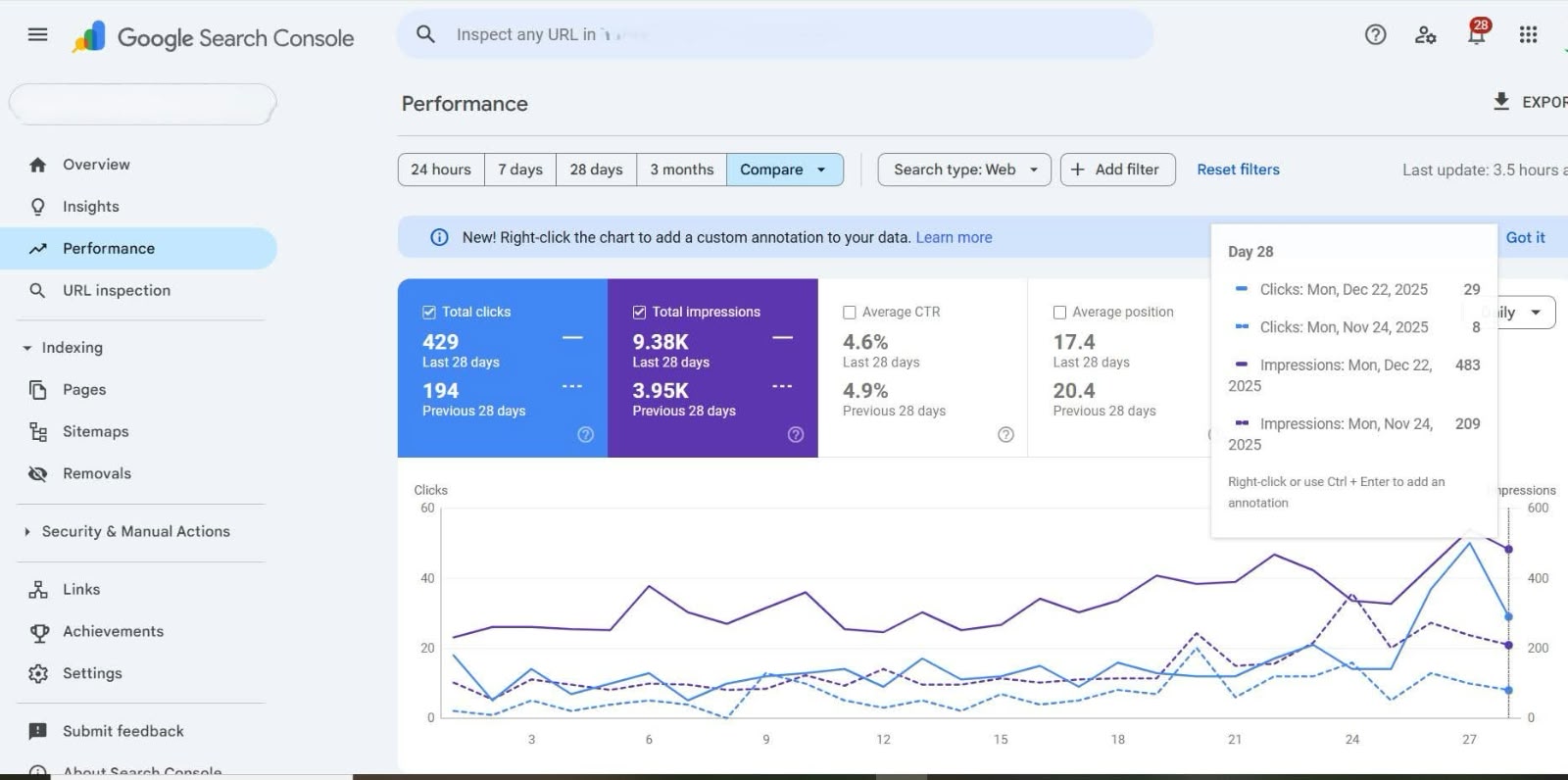
Google Search Console comparison showing 429 clicks and 9.38 thousand impressions in the latest 28 days against 194 clicks and 3.95 thousand impressions in the previous period
Google Search Console: latest 28 days compared with the previous 28 days.
+121%click growth
194 to 429
+137%impression growth
3.95K to 9.38K
3 placesranking improvement
20.4 to 17.4
4.6%average CTR
latest 28 days

Business value: the business more than doubled both clicks and search visibility in the latest 28 days, creating more opportunities for potential customers to discover its services.

I connect every SEO task to the business goal.

  1. 01

    Understand the business goals

    I learn what the business offers, who it needs to reach, which services matter most and what the website should help people do.

  2. 02

    Define success and record the baseline

    I agree on useful measures such as qualified clicks, enquiries, visibility, indexed pages or completed fixes, then record the current position before making changes.

  3. 03

    Investigate the website and search landscape

    I review Search Console and analytics data, crawl the website, inspect priority URLs, research queries and compare the pages already performing in search.

  4. 04

    Prioritise the opportunities

    I separate urgent crawling or indexing problems from content, metadata and internal-link improvements, then order the work by likely impact and effort.

  5. 05

    Implement the agreed improvements

    I update the content, headings, metadata, internal links or technical setup in the appropriate platform while following the brand and approval process.

  6. 06

    Verify every change

    I check the live page and source, test links, recrawl affected URLs and use URL Inspection or Request Indexing when the page and situation require it.

  7. 07

    Report, follow up and improve

    I document what changed, monitor the agreed measures over a fair comparison period and decide the next action from verified results rather than assumptions.

A practical toolkit for research, implementation and reporting.

01

Research and planning

Finding demand, search intent, content gaps and realistic opportunities before choosing a direction.

AhrefsSemrushGoogle Keyword PlannerGoogle TrendsUbersuggestSurfer SEONeuronWriter
02

Technical SEO and indexing

Crawling, inspecting and validating how search engines access, understand and index the website.

Screaming FrogGoogle Search ConsolePageSpeed InsightsLighthouseRich Results TestSchema.org ValidatorYoastRank MathAIOSEO
03

Analytics and reporting

Turning search and behaviour data into clear baselines, reporting views and next actions.

Google Analytics 4Looker StudioGoogle SheetsMicrosoft Excel
04

Publishing and content

Writing, optimising and publishing useful pages while checking the final live implementation.

WordPressDiviElementorAstraShopifyCanva
05

Workflow and collaboration

Keeping tasks, approvals, feedback and progress organised across the people involved.

TrelloAsanaMonday.comNotionSlackGoogle Workspace

Is your business visible when your ideal customer is ready to choose?

Let’s build a focused SEO, GEO and AEO plan that helps the right people discover your business, understand its value and take the next step.